
When a chat room can hold an email, a document and a calendar entry
Designing the employee collaboration layer of an enterprise operations platform, where tagging turns a conversation into the place the work actually lives.
GegoSoft designs and builds the interface layer of this platform — the Angular web application and the Android app. Backend services, architecture and product direction belong to the client. What follows describes the interface design and the reasoning behind it.
- CLIENT
- Australian MSP
- OUR SCOPE
- UI/UX, web and mobile
- STACK
- Angular, Android
- TEAM
- 4 members
- MODEL
- Distributed delivery
Most collaboration suites are a bundle with one login
Chat in one place, files in another, calendar somewhere else, email in a fourth. Each works. Nothing connects. The person using it becomes the integration layer, holding in their head that the file about Tuesday's incident is in a folder, the decision is in a chat thread, and the customer's reply is in an inbox.
This client is a managed services provider maintaining communications and networking estate across hotels, hospitals and corporate campuses. Their staff are already holding a lot: which device, which site, which contract, which engineer. Asking them to also remember where each piece of a conversation lives is a real cost.
The design question was not what features a collaboration tool needs. It was what makes a conversation the place the work lives, rather than a place people talk about work happening elsewhere.
Tagging as the connective tissue
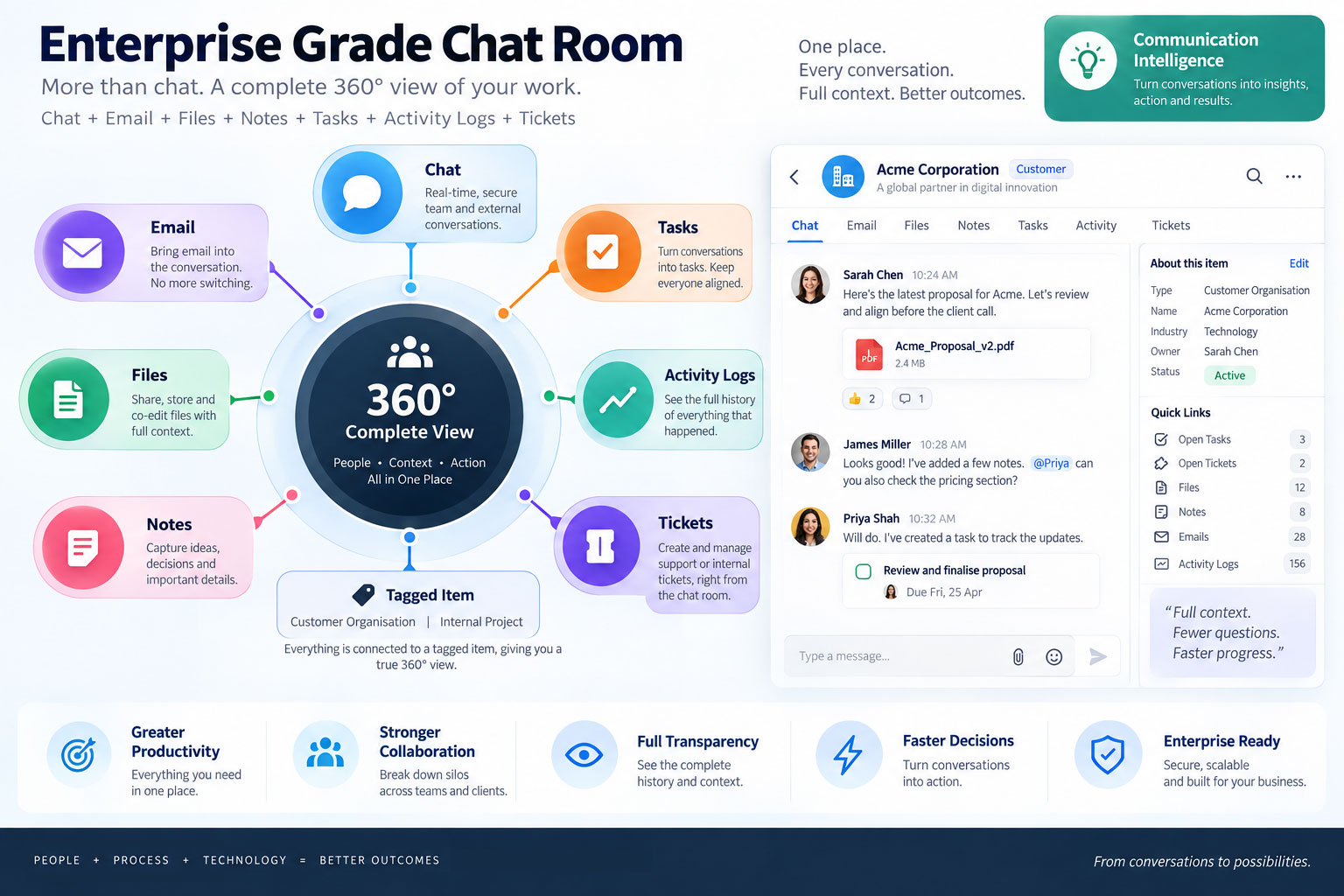
Emails, calendar entries and documents are all taggable. Tag any of them with a chat room and it links into that room. The conversation stops being a message list and becomes the context for a piece of work — with the mail that started it, the document that describes it and the meeting where it was agreed all reachable from the same place.
Tags are entered freely, with existing tags suggested as you type. That combination matters more than it sounds. A controlled vocabulary means an administrator has to create every tag before anyone can use one, so people stop tagging and the feature quietly dies. Unassisted free text gives you invoice, invoices, Invoice and invoicing within a month, and the link graph degrades without anyone noticing.
Suggesting as they type puts no gate on creating a tag, while making reuse the path of least resistance. The taxonomy emerges from how people actually work, and stays coherent because the interface makes the coherent choice the easy one. Tags are scoped per tenant, so one customer's vocabulary never leaks into another's.
What that costs on the interface side
One affordance, everywhere
Tagging has to look and behave identically on an email, a document and a calendar entry. The moment it differs by object type, the model becomes something users have to learn per screen instead of once.
Suggestions have to be instant
A tag picker with visible latency gets abandoned mid-word, and the user types a near-duplicate instead. The anti-duplication benefit depends entirely on the suggestion arriving before the next keystroke.
Rooms render mixed objects
A room may contain messages, a linked email, a document and a meeting. Each needs enough identity to be recognised at a glance, without the room turning into a list of dissimilar cards.
Two decisions in the chat interface worth naming
Replies stop at two levels
Threading is capped at two levels of reply. This is a constraint we chose, not a limitation we accepted. Unlimited nesting produces threads nobody can follow, indent levels that collapse on a phone, and conversations that fork until the room has no shared state. Two levels covers the case that matters — a direct response, and a response to that — and stops there.
Files get a tab and a mention
Every room has its own Files tab. Uploading a file there also posts a notification into the conversation.
That solves a genuine two-surface problem. Files need a durable home you can browse later — scrolling a chat history to find last month's site diagram is nobody's idea of document retrieval. But a file uploaded silently into a tab is a file nobody knows exists. Most tools pick one behaviour and lose the other. Doing both means the file is findable in three months and visible in the moment it lands.
My Workspace: what we built around rather than rebuilt
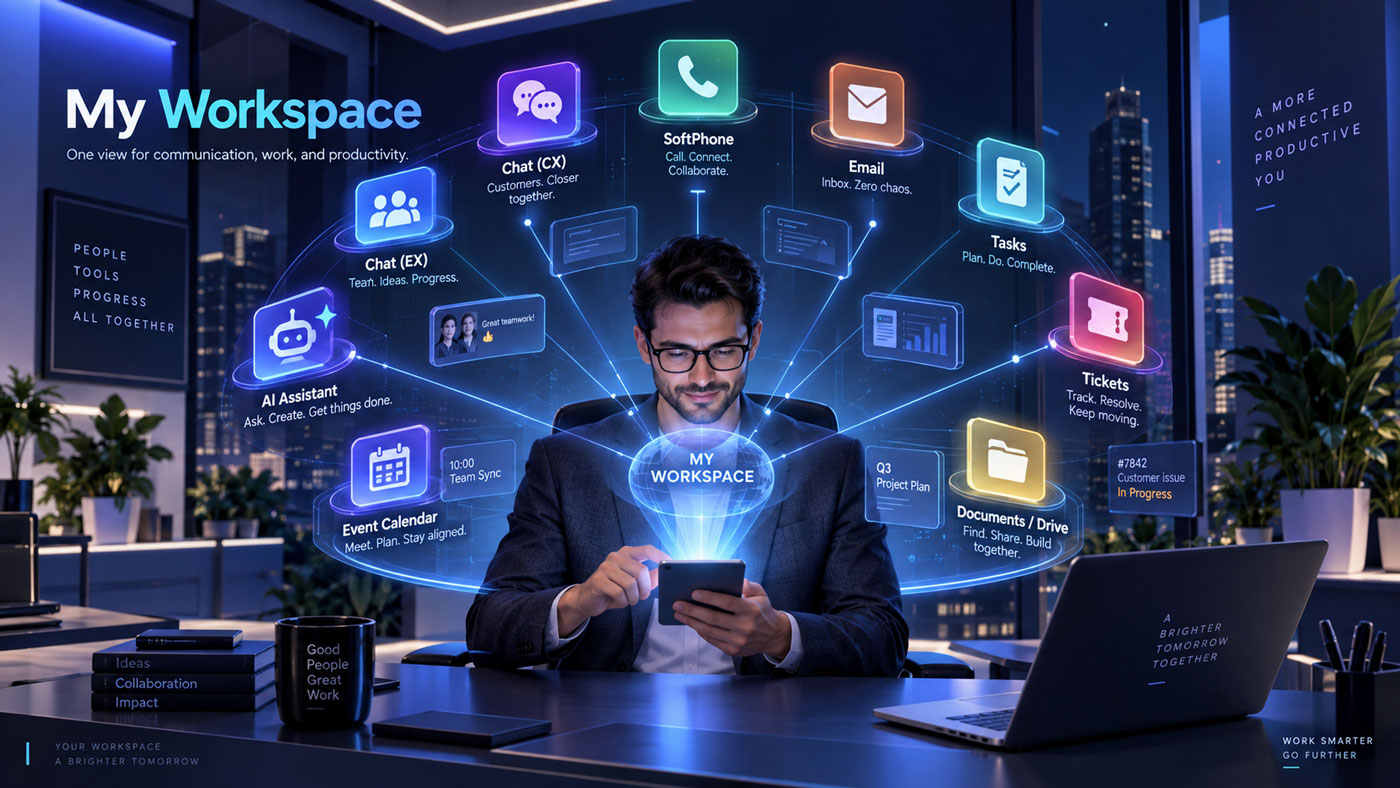
Mail runs over IMAP on a two-minute poll. Calendar syncs with Outlook or Google depending on how the organisation is configured. Documents are backed by Google Drive or OneDrive.
Documents in particular could have been built natively. Doing so would have meant taking on storage, versioning, preview rendering, sharing, permissions and collaborative editing — and competing with Google and Microsoft on all six at once, inside a product whose actual job is service operations. The customer's files also stay where their IT department already governs them, which for a business serving hospitals and corporate campuses is not a small consideration.
So the design work was not a document module. It was making borrowed objects behave like native ones: taggable, linkable into a room, present in the interface without the platform pretending to own them.
Mail on a two-minute poll carries a similar honesty requirement. Anyone comparing this to a native mail client will notice the difference, so the interface has to be clear about when it last synced rather than implying a live inbox.
Tasks and events
Tasks attach to a room or a ticket rather than floating in a separate list — the same principle as tagging, applied to work items. Events are meetings, single or recurring.
How we work on this platform
Part of a long-running engagement, delivered as the interface team inside the client's own distributed process.
Design before the API
We agree requirements with the client's project manager, design and iterate the screens, and the backend team supplies APIs afterwards. The interface defines the contract rather than inheriting whatever a backend already returns.
Four surfaces, repeated
List view, detail view, forms, action modals. Almost all of an enterprise platform is these four at scale. Solving them once is what lets a product this size stay learnable.
Progressive disclosure
Depth appears on request rather than by default — a convention applied across the platform, from permission controls to routing configuration.
Web first, then mobile
The Android app follows once web functionality settles. Designing mobile against moving requirements produces two divergent products rather than one on two screens.
Common questions
Can GegoSoft design and build an enterprise collaboration tool?
Yes. We design and build the interface layer of an enterprise operations platform covering collaboration, customer engagement, service desk, dashboards and administration, in Angular for web and native Android for mobile. We work as the interface team inside a client's own delivery process, alongside their backend and QA teams.
Should tags be free-form or a controlled vocabulary?
Free-form, with existing tags suggested as the user types. A controlled vocabulary requires an administrator to create tags before anyone can use them, so tagging stops happening. Unassisted free text produces near-duplicates within weeks. Suggesting on input keeps creation open while making reuse the easiest path, so the taxonomy emerges from real use and stays coherent.
Why limit chat threading to two levels?
Unlimited nesting produces threads that are hard to follow, indentation that fails on mobile, and conversations that fork until a room has no shared state. Two levels covers a reply and a reply to that reply, which is where most useful threading stops.
Should a collaboration platform build its own document management?
Usually not. Building it natively means taking on storage, versioning, preview, sharing, permissions and collaborative editing, and competing with Google and Microsoft on all of them. Integrating with Google Drive or OneDrive keeps files under the customer's existing governance. The design work becomes making those documents behave like native objects inside your interface.
Do you design, or only implement designs we provide?
We do both, and on this engagement we design. We work through requirements with the client's project manager, produce and iterate the screens, and hand a finalised design to the backend team who then build APIs to serve it. If you already have a design team, we can implement to their specifications instead.
Can you work with our existing backend and QA teams?
Yes, that is how this engagement runs. Requirements are agreed directly with the client, backend APIs come from their team, and their test team and stakeholders review and approve. Distributed delivery across organisations is normal practice for us rather than an exception.
More from this platform
Building software people use all day?
Tell us what your users have to hold in their heads to get through their work. That is usually where the interface is failing them, and it is the first thing we look at.
Start a conversation See all case studies