
Configuring what happens on a call nobody has made yet
Designing the routing configuration for an omnichannel contact centre — where an administrator describes an event that has not happened, to a person they will never meet, and finds out whether they got it right when a real customer arrives.
GegoSoft designs and builds the interface layer of this platform — the Angular web application and the Android app. Backend services, architecture and product direction belong to the client. What follows describes the interface design and the reasoning behind it.
- CLIENT
- Australian MSP
- ROUTING
- Skill and group based
- CHANNELS
- Voice, email, chatbot
- STACK
- Angular, Android
- OUR SCOPE
- UI/UX, web and mobile
The hardest kind of admin screen
Most configuration has a visible result. Change a setting, look at the thing, see whether it worked. If it is wrong you notice immediately, usually within seconds, and you fix it.
Routing has none of that. An administrator is describing what should happen to a person who has not called yet, at a time that has not arrived, about a problem nobody has had. There is no screen to check afterwards. The first feedback is a real customer at nine in the evening on a public holiday, reaching a queue that nobody is staffing.
When the consequence of a setting is invisible until it affects someone real, the interface has to carry the understanding the feedback loop cannot.
That is what this module is about. Not making routing configurable — the backend does that — but making an administrator confident about behaviour they will never directly observe.
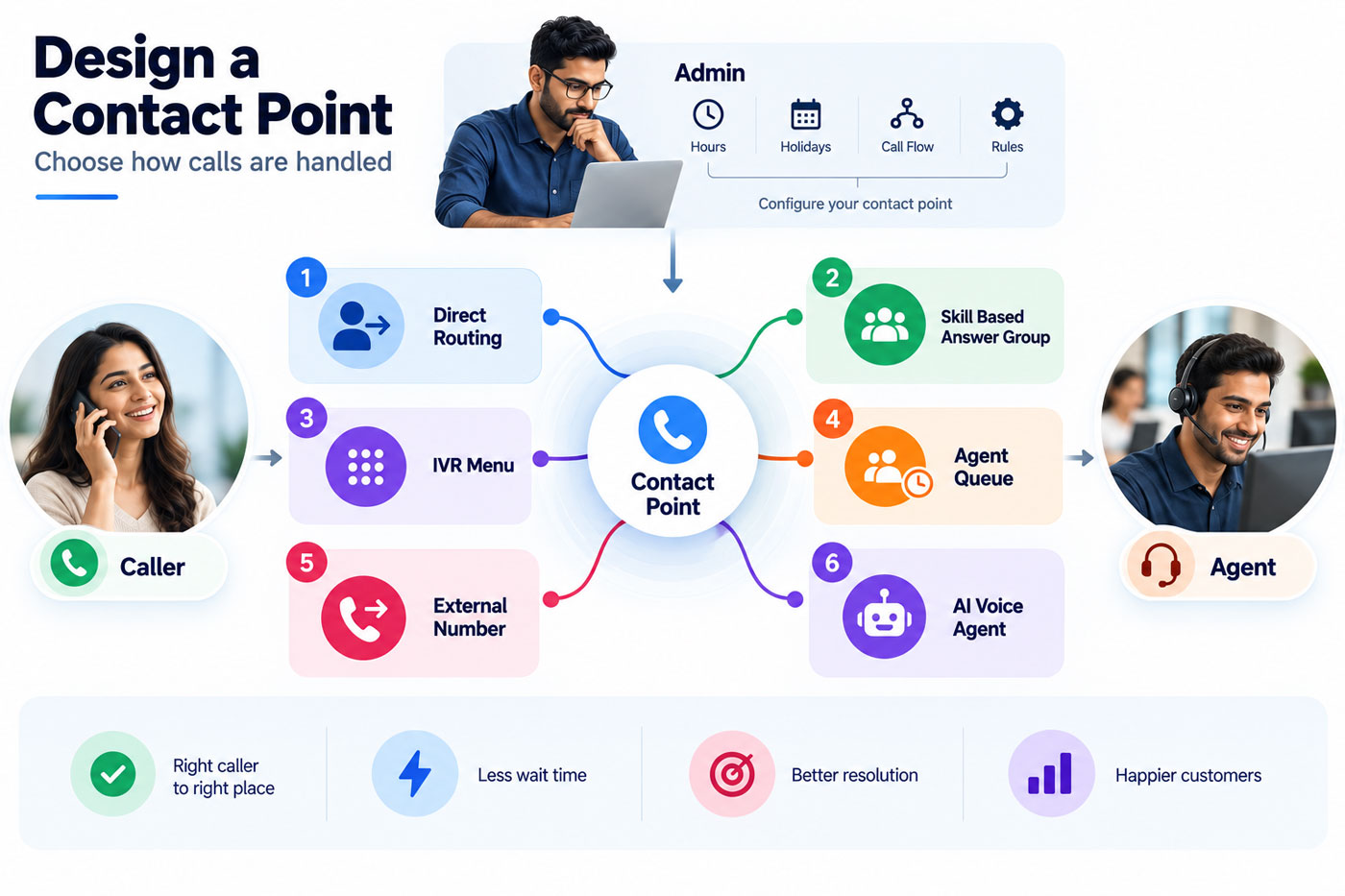
Six destinations, chosen with one click
A contact point — a phone number, a support address, a chat widget — has to end somewhere. The administrator picks one of six destinations, and the six behave nothing alike.
Direct forward
Straight through to a number. No queue, no logic, no waiting.
Answer group
Into a team, distributed among its members by a defined strategy.
Customer engagement
Into the platform's own agent queue, alongside every other channel.
IVR or bot
Into an automated exchange that gathers information before anyone answers.
External system
Out to something the organisation runs elsewhere.
Service desk
Straight into ticketing, where the contact is work rather than a conversation.
Presenting six options that produce entirely different experiences is a naming problem before it is a layout problem. An administrator choosing between them needs to understand the consequence, not the label — and the interface has to convey that difference without a paragraph of explanation beside every radio button.
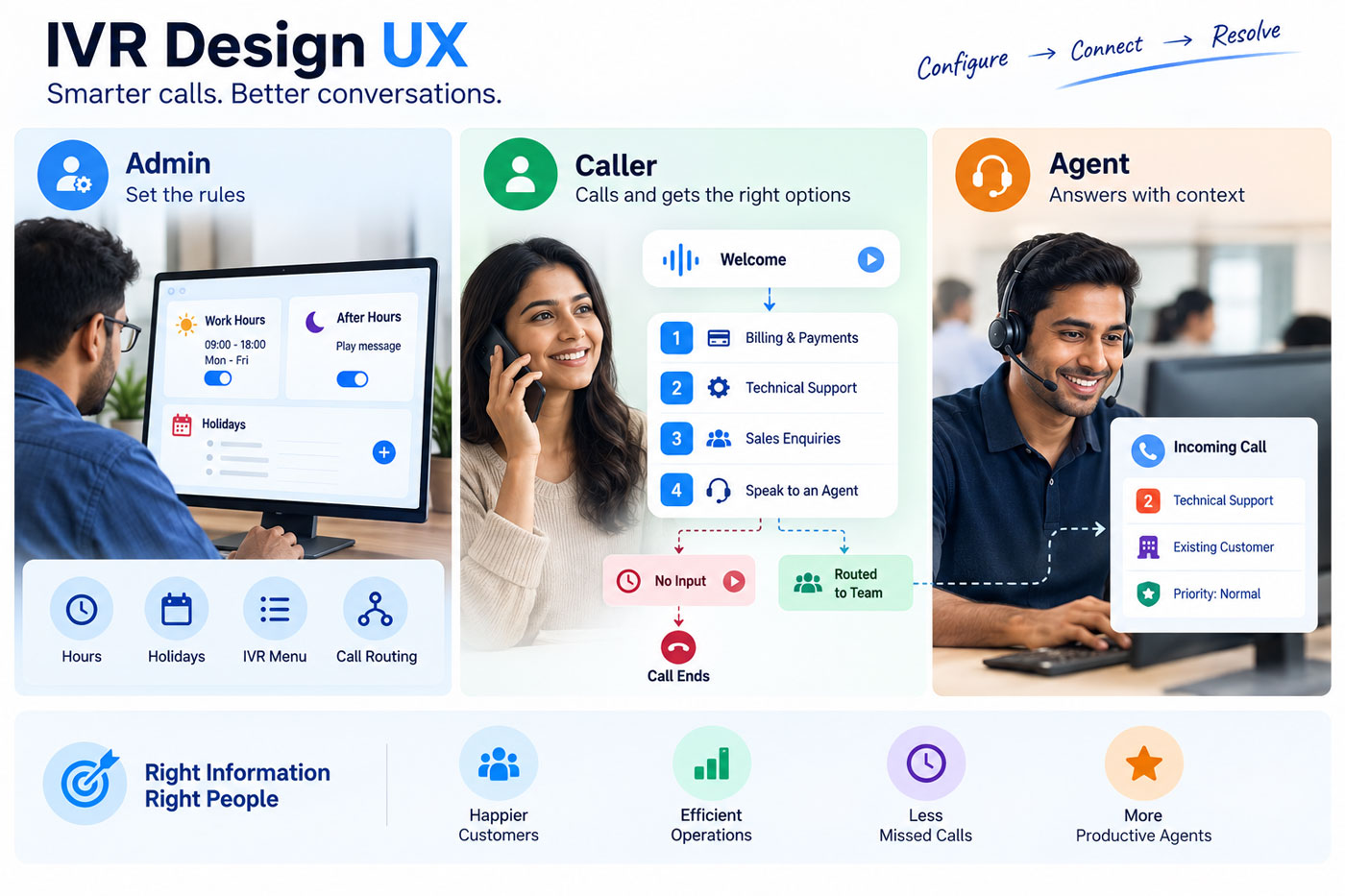
Two different questions about who answers
Routing is usually described as one problem. It is two, and separating them is what makes the configuration comprehensible.
Who is eligible at all
Skills are defined per agent at three levels — beginner, intermediate, expert — and routing can require a competency before an interaction reaches someone. A caller with a network fault should not land with an agent who handles billing, however available they are.
The part that matters most in the interface is the fallback. When nobody with the required skill is free, the interaction goes to the department default. A skill-based system without an explicit fallback silently drops callers into nothing, so the default is not buried in advanced settings — it is part of setting up the rule.
Which of the eligible people gets it
Within a group, distribution follows a named strategy. Top down always starts at the same person. Circular takes turns. Longest idle picks whoever has waited longest. Broadcast offers it to everyone at once.
These are not interchangeable, and the difference is organisational rather than technical. Top down suits a team with a clear escalation order. Circular distributes load evenly. Longest idle is fairest when interactions vary in length. Broadcast trades politeness for speed when nothing should wait.
An administrator picking between them is making a decision about how their team should work, and the interface should make that feel like the choice it is rather than a technical toggle.
Five objects decide what one caller experiences
The real difficulty is not any single screen. It is that a caller's experience is determined by a chain of objects, each configured somewhere else.
Contact point
The number, address or widget they arrived through.
Business hours
Whether anyone is working at this moment, defined per team.
Holiday list
Whether today is an exception to those hours.
Answer group
Which team, and how the interaction is distributed within it.
The agent
Who actually answers — the only part the caller ever perceives.
Each link is configured on a different screen, and none of them shows the whole sequence. An administrator setting business hours for a team cannot see which contact points depend on them; someone changing an answer group cannot see which numbers resolve to it.
Making schedules and groups reusable objects rather than settings buried inside each contact point is part of the answer — one definition, referenced in many places, changed once. Attaching hours optionally rather than always is another: a round-the-clock line should not have to declare hours it does not observe.
Ten keys, ten near-identical rows
Choosing an IVR destination reveals a menu builder: an announcement, then a mapping for each keypad digit, each needing an action and a target.
A telephone keypad menu is an old interaction wearing modern clothes, and the design problem it creates is specific. Ten rows that look almost the same, differing only in two dropdown values, is exactly the arrangement in which a misconfiguration hides. An administrator who has sent key 4 to the wrong queue will not spot it by scanning, because every row looks like every other row.
So the work goes into making the rows scannable — consistent alignment so the eye travels down the values rather than the labels, and unset keys reading as clearly unset rather than as an ambiguous default.
Information gathered before anyone answers
Variables collected during the IVR exchange — a customer reference, a date of birth, a policy number — travel with the interaction. Webhooks can validate those against the organisation's own systems mid-call, so by the time an agent picks up, the caller has already been identified and does not have to repeat themselves.
What we would add next
There is no way to test a routing configuration before it is live. An administrator sets up a contact point, a schedule and an answer group, saves it, and waits to find out whether the reasoning held.
The change that would most improve this module is a simulation — describe a caller, a time and a date, and see which agent they would reach and why. It would close the feedback loop the whole design currently works around, and it would turn the resolution chain from something an administrator holds in their head into something the software can explain back to them.
We mention it because naming the most valuable missing thing in a design you built is more useful to anyone evaluating us than a page implying nothing was left undone.
Design decisions
Part of a long-running engagement, delivered as the interface team inside the client's own distributed process.
Depth on request
The IVR builder appears only when that destination is chosen; hours appear only when a schedule is required. The same convention governs the platform's permission screens.
Schedules and groups are objects
Defined once and referenced by everything that needs them, rather than re-entered per contact point. One change, applied everywhere it was meant to apply.
Fallbacks are part of the rule
What happens when no eligible agent is available is set where the rule is set, not hidden in advanced options. A routing rule without a defined fallback is a dropped caller waiting to happen.
One model across channels
Voice, email and chatbot route through the same concepts. An administrator learns routing once rather than three times.
Common questions
Can GegoSoft design call routing or IVR configuration interfaces?
Yes. We design and build the routing and IVR administration screens of an omnichannel contact centre platform, covering contact points, skill-based routing, distribution strategies, schedules and menu builders, in Angular for web and native Android for mobile.
What is skill-based routing, and how does it differ from queue distribution?
They answer different questions. Skill-based routing decides who is eligible to receive an interaction, by matching a required competency against agent skills. Distribution strategy decides which of those eligible agents actually gets it. A system needs both, and conflating them makes configuration hard to reason about.
What happens when no agent with the required skill is available?
The interaction falls through to a department default. Defining that fallback should be part of creating the rule rather than an advanced setting, because a skill requirement without a fallback silently strands callers when the right people are busy.
Which call distribution strategy should a team use?
It depends on how the team is meant to work. Top down suits a defined escalation order. Circular spreads load evenly. Longest idle is fairest when interactions vary in length. Broadcast is fastest when nothing should wait. The choice is organisational rather than technical, and the interface should present it that way.
Why is routing configuration harder to design than other admin screens?
Because the result is invisible at the moment of configuration. Most settings can be checked immediately; a routing rule describes what will happen to someone who has not called yet. With no feedback loop, the interface has to carry the understanding that observation would otherwise provide.
Should business hours and holidays be separate from contact points?
Yes. Schedules are shared across many numbers, addresses and teams, so defining them once as reusable objects means a change applies everywhere it should. Embedding hours inside each contact point guarantees they drift apart over time.
More from this platform
Configuration screens nobody can reason about?
Tell us what your administrators have to set up and how they find out whether they got it right. When the answer is "a customer complains", the interface is doing less work than it should.
Start a conversation See all case studies